> ## Documentation Index
> Fetch the complete documentation index at: https://docs-dev.byterover.dev/llms.txt
> Use this file to discover all available pages before exploring further.
# Local vs Cloud (v2.6.0 and earlier)
> What ByteRover CLI does offline, what requires a cloud account, and how to upgrade from local to team sync
**This page documents ByteRover CLI v2.6.0 and earlier.** The `brv push`, `brv pull`, and `brv space switch` commands described here have been deprecated in v3.0.0. For the current workflow, see [Getting Started](/quickstart) which uses Git-Semantic version control (`brv vc`) for all sync operations.
ByteRover CLI runs entirely on your machine with no cloud account required. Cloud features layer on top — adding team sync, multi-machine access, and backup — without changing the core local workflow.
## Commands: local vs cloud
Commands available in the interactive REPL (`brv`):
| Works locally (no auth) | Requires cloud auth |
| --------------------------------------------------- | -------------------------------------- |
| `/status` — show local project state | `/login` — authenticate with ByteRover |
| `/locations` — list registered projects | `/logout` — clear authentication |
| `/curate` — add context to local knowledge tree | `/push` — sync local context to cloud |
| `/query` — query local context tree | `/pull` — pull context from cloud |
| `/connectors` — manage agent connectors | `/space list` — list team spaces |
| `/hub` — browse and install skills & bundles | `/space switch` — switch active space |
| `/providers` — connect and switch LLM providers `*` | |
| `/model` — select a model `*` | |
| `/reset` — clear local context tree | |
| `/new` — start a fresh session | |
Standalone commands available from any terminal:
| Works locally (no auth) | Requires cloud auth |
| ------------------------------------------------------- | ---------------------------------------- |
| `brv` — start interactive REPL | `brv login` — authenticate with API key |
| | `brv logout` — clear cloud credentials |
| `brv status` — show CLI status and context tree | `brv push` — sync local context to cloud |
| `brv locations` — list registered projects | `brv pull` — pull context from cloud |
| `brv query` — query context tree | `brv space list` — list team spaces |
| `brv curate` — add context to knowledge tree | `brv space switch` — switch active space |
| `brv providers` / `list` / `connect` / `disconnect` `*` | |
| `brv model` / `list` / `switch` `*` | |
| `brv connectors` / `list` / `install` | |
| `brv hub` / `list` / `install` | |
| `brv restart` — restart the daemon | |
`*` Provider and model commands work locally for third-party providers. However, selecting or switching to the **ByteRover built-in** provider requires a logged-in ByteRover account (`/login` or `brv login`).
## Upgrade from local to cloud
Run `/login` inside the REPL to authenticate via browser:
```
/login
```
Select a team space. ByteRover updates `.brv/config.json` and automatically pulls any existing context from the remote space.
```
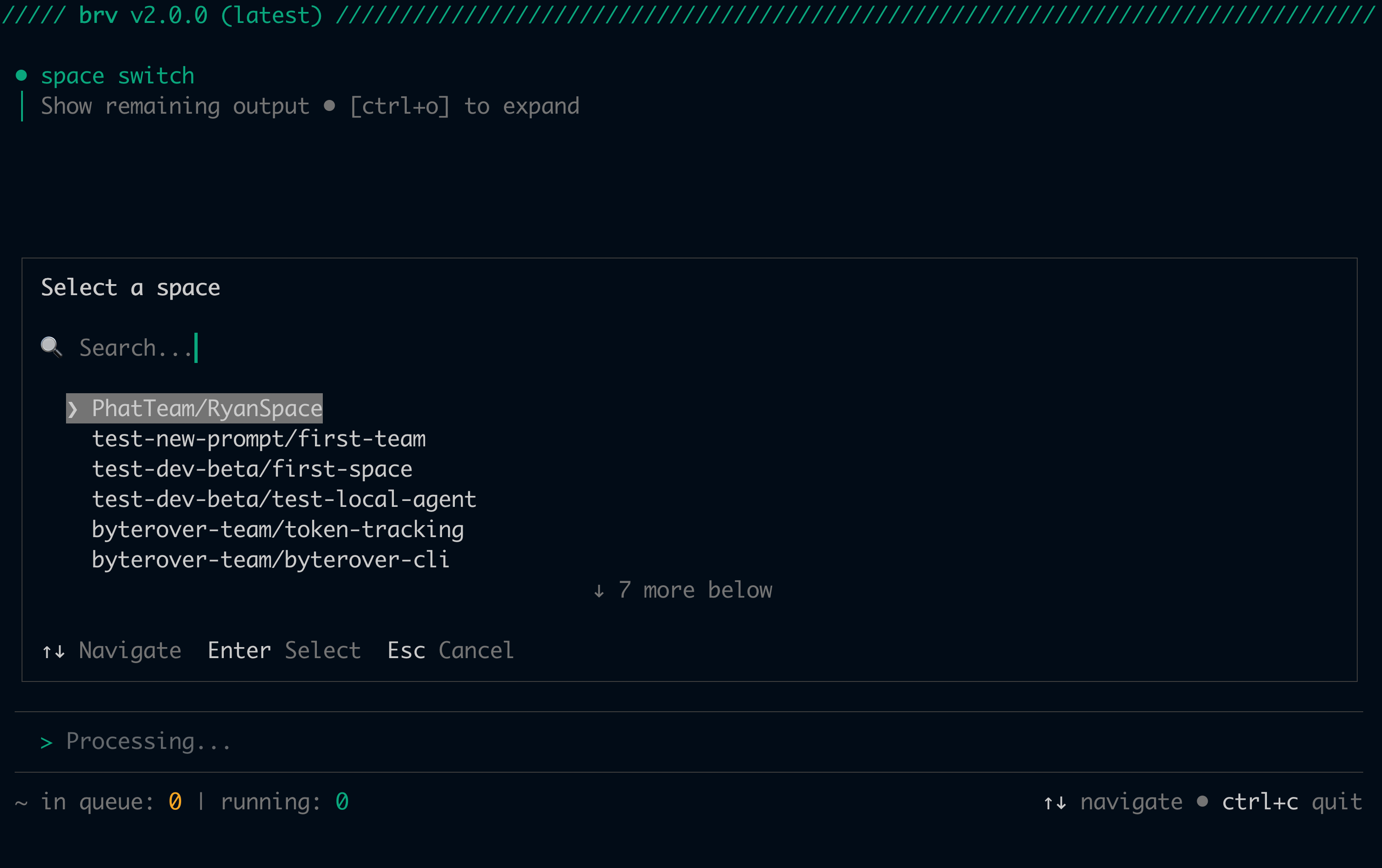
/space switch
```
An interactive picker lists all spaces across your teams. Selecting one switches your project and pulls remote context in a single step.
 Sync your `.brv/context-tree/` to the remote space. Teammates can pull this immediately after.
```
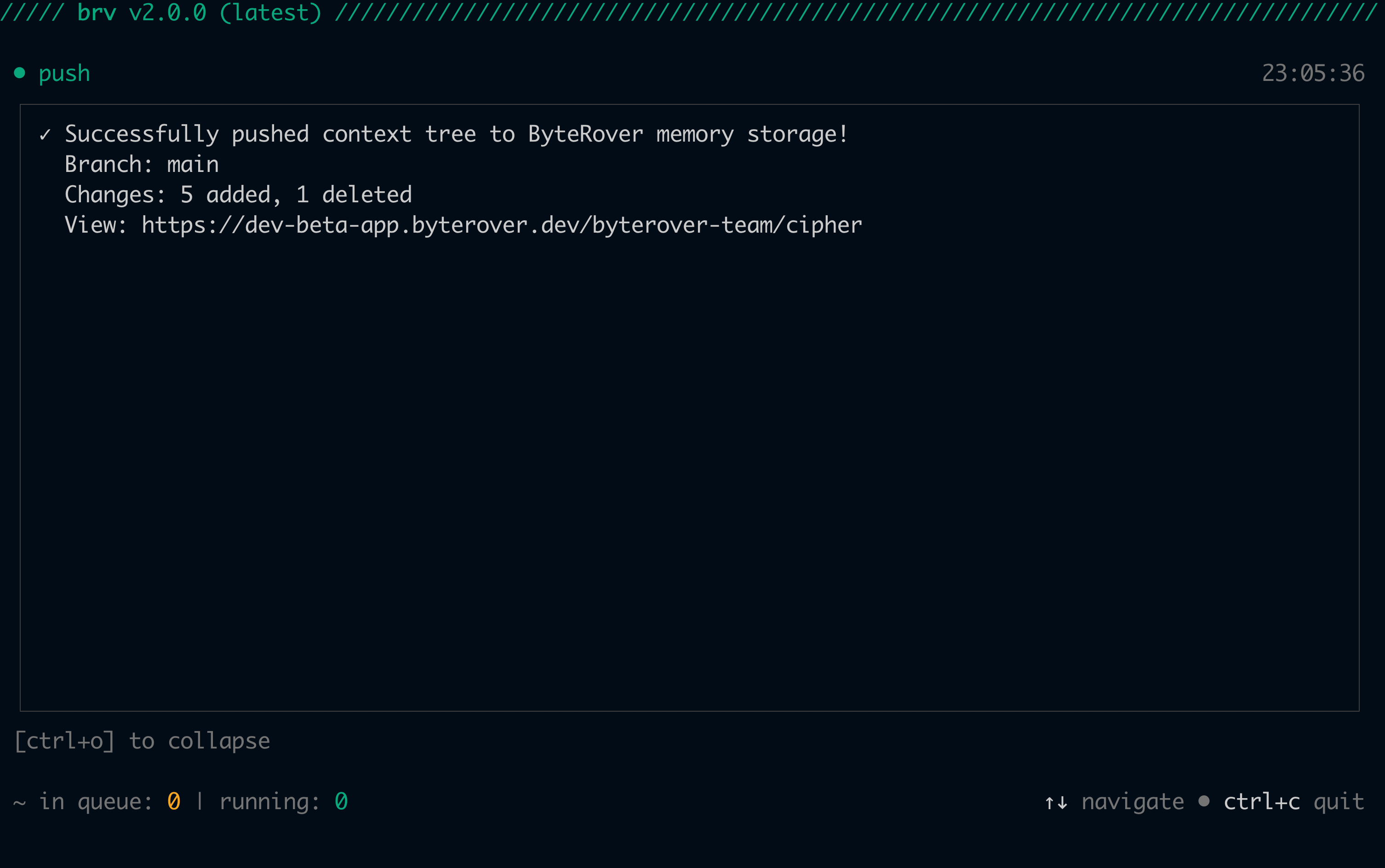
/push
```
Sync your `.brv/context-tree/` to the remote space. Teammates can pull this immediately after.
```
/push
```
 On any machine where you're authenticated, run `/space switch` to select the same space — it automatically pulls remote context. After the initial switch, use `/pull` to sync subsequent changes from teammates.
Use an API key — get one from [app.byterover.dev/settings/keys](https://app.byterover.dev/settings/keys):
```bash theme={null}
brv login --api-key
```
Select a team space. ByteRover updates `.brv/config.json` and automatically pulls any existing context from the remote space.
```bash theme={null}
brv space switch --team --name
```
Sync your `.brv/context-tree/` to the remote space.
```bash theme={null}
brv push
```
On any new machine where you're authenticated, switch to the same space then pull:
```bash theme={null}
brv space switch --team --name
brv pull
```
After the initial switch, use `brv pull` to sync subsequent changes from teammates.
## When to use cloud
| Use case | Why |
| ---------------------- | ----------------------------------------------------------------------- |
| **Team collaboration** | Share a space with teammates — everyone queries the same knowledge base |
| **Multi-machine sync** | Push from your laptop, pull on a server or a new machine |
| **Backup** | Persist your context tree outside the local repo |
All local features — curate, query, provider selection, hub, connectors — work without a cloud account and without an internet connection when using a third-party or local LLM provider. The ByteRover built-in provider requires a logged-in ByteRover account.
On any machine where you're authenticated, run `/space switch` to select the same space — it automatically pulls remote context. After the initial switch, use `/pull` to sync subsequent changes from teammates.
Use an API key — get one from [app.byterover.dev/settings/keys](https://app.byterover.dev/settings/keys):
```bash theme={null}
brv login --api-key
```
Select a team space. ByteRover updates `.brv/config.json` and automatically pulls any existing context from the remote space.
```bash theme={null}
brv space switch --team --name
```
Sync your `.brv/context-tree/` to the remote space.
```bash theme={null}
brv push
```
On any new machine where you're authenticated, switch to the same space then pull:
```bash theme={null}
brv space switch --team --name
brv pull
```
After the initial switch, use `brv pull` to sync subsequent changes from teammates.
## When to use cloud
| Use case | Why |
| ---------------------- | ----------------------------------------------------------------------- |
| **Team collaboration** | Share a space with teammates — everyone queries the same knowledge base |
| **Multi-machine sync** | Push from your laptop, pull on a server or a new machine |
| **Backup** | Persist your context tree outside the local repo |
All local features — curate, query, provider selection, hub, connectors — work without a cloud account and without an internet connection when using a third-party or local LLM provider. The ByteRover built-in provider requires a logged-in ByteRover account.