> ## Documentation Index
> Fetch the complete documentation index at: https://docs-dev.byterover.dev/llms.txt
> Use this file to discover all available pages before exploring further.
# Configuration
> Manage daemon-wide settings, agent connectors, and version-control identity from the browser
The Configuration tab is the browser equivalent of `brv settings`, `brv connectors`, and `brv vc config` / `brv vc remote`. It's organised as three sections, picked from a sidebar on the left:
* **General** — daemon-wide runtime settings: concurrency, LLM time budgets, and task-history retention.
* **Connectors** — wire-up for coding agents like Claude Code, Cursor, and Codex.
* **Version control** — git identity (`user.name` / `user.email`), the `origin` remote, and agent-edit supervision.
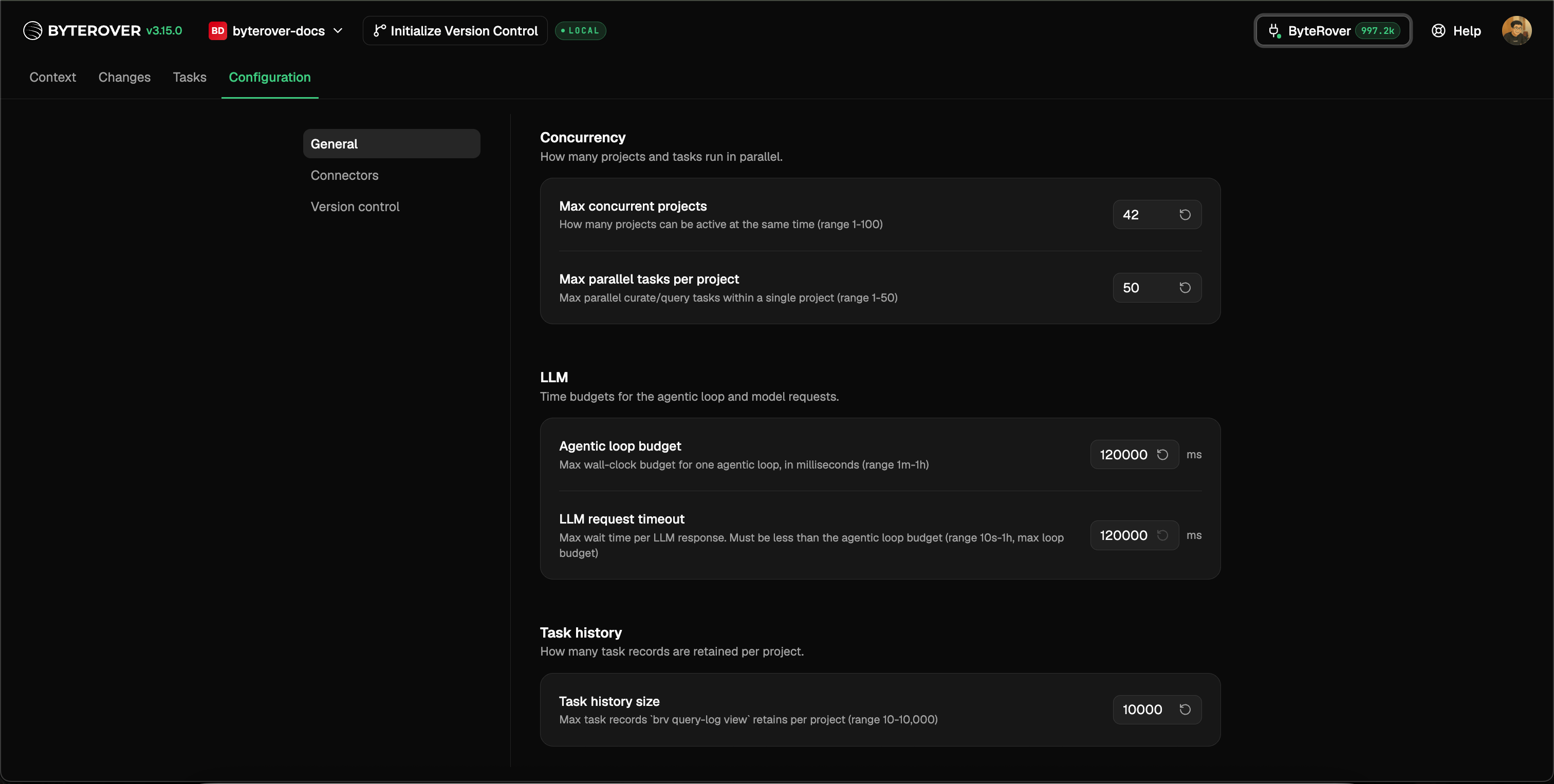 When you change a value that requires `brv restart`, a banner appears at the top of the page until you've restarted the daemon.
## General
When you change a value that requires `brv restart`, a banner appears at the top of the page until you've restarted the daemon.
## General
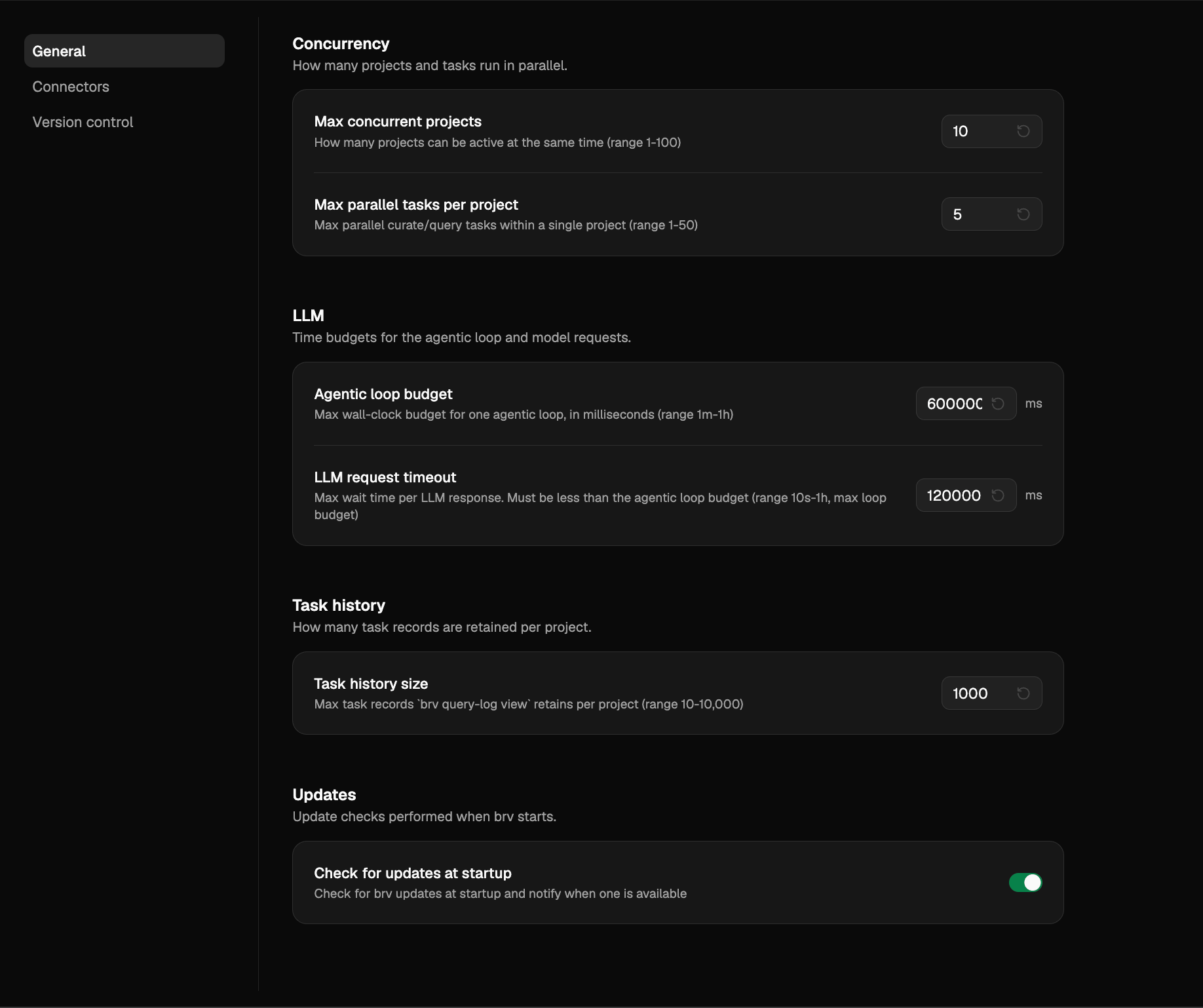 Four panels stacked on the General tab, one per category in the [`brv settings`](/reference/brv-settings) registry. Each row shows the key, its current value, and the registered default. Click the value to edit it inline.
* **Concurrency** — `agentPool.maxSize` and `agentPool.maxConcurrentTasksPerProject`. Controls how many projects can be active simultaneously and how many parallel `brv curate` / `brv query` tasks one project can run.
* **LLM** — `llm.iterationBudgetMs` and `llm.requestTimeoutMs`. Wall-clock budgets for one agentic loop and one LLM HTTP request. `requestTimeoutMs` must be ≤ `iterationBudgetMs`; the panel surfaces the constraint when you violate it.
* **Task history** — `taskHistory.maxEntries`. Per-project cap on the records the [Tasks tab](/local-web-ui/tasks) retains.
* **Updates** — `update.checkForUpdates`. Toggle (default on) for whether `brv` checks for new versions at startup and runs the background auto-update. Turning it off silences the y/n update prompt; manual `brv update` still works.
Most General-section settings require `brv restart` to take effect — the restart banner at the top of the page reminds you when one is pending. The **Updates** panel is the exception: it takes effect on the next `brv` invocation, no restart needed. The same values are reachable from the CLI; see [`brv settings`](/reference/brv-settings) for the full key reference, value formats, and the on-disk location of `settings.json`.
## Connectors
Four panels stacked on the General tab, one per category in the [`brv settings`](/reference/brv-settings) registry. Each row shows the key, its current value, and the registered default. Click the value to edit it inline.
* **Concurrency** — `agentPool.maxSize` and `agentPool.maxConcurrentTasksPerProject`. Controls how many projects can be active simultaneously and how many parallel `brv curate` / `brv query` tasks one project can run.
* **LLM** — `llm.iterationBudgetMs` and `llm.requestTimeoutMs`. Wall-clock budgets for one agentic loop and one LLM HTTP request. `requestTimeoutMs` must be ≤ `iterationBudgetMs`; the panel surfaces the constraint when you violate it.
* **Task history** — `taskHistory.maxEntries`. Per-project cap on the records the [Tasks tab](/local-web-ui/tasks) retains.
* **Updates** — `update.checkForUpdates`. Toggle (default on) for whether `brv` checks for new versions at startup and runs the background auto-update. Turning it off silences the y/n update prompt; manual `brv update` still works.
Most General-section settings require `brv restart` to take effect — the restart banner at the top of the page reminds you when one is pending. The **Updates** panel is the exception: it takes effect on the next `brv` invocation, no restart needed. The same values are reachable from the CLI; see [`brv settings`](/reference/brv-settings) for the full key reference, value formats, and the on-disk location of `settings.json`.
## Connectors
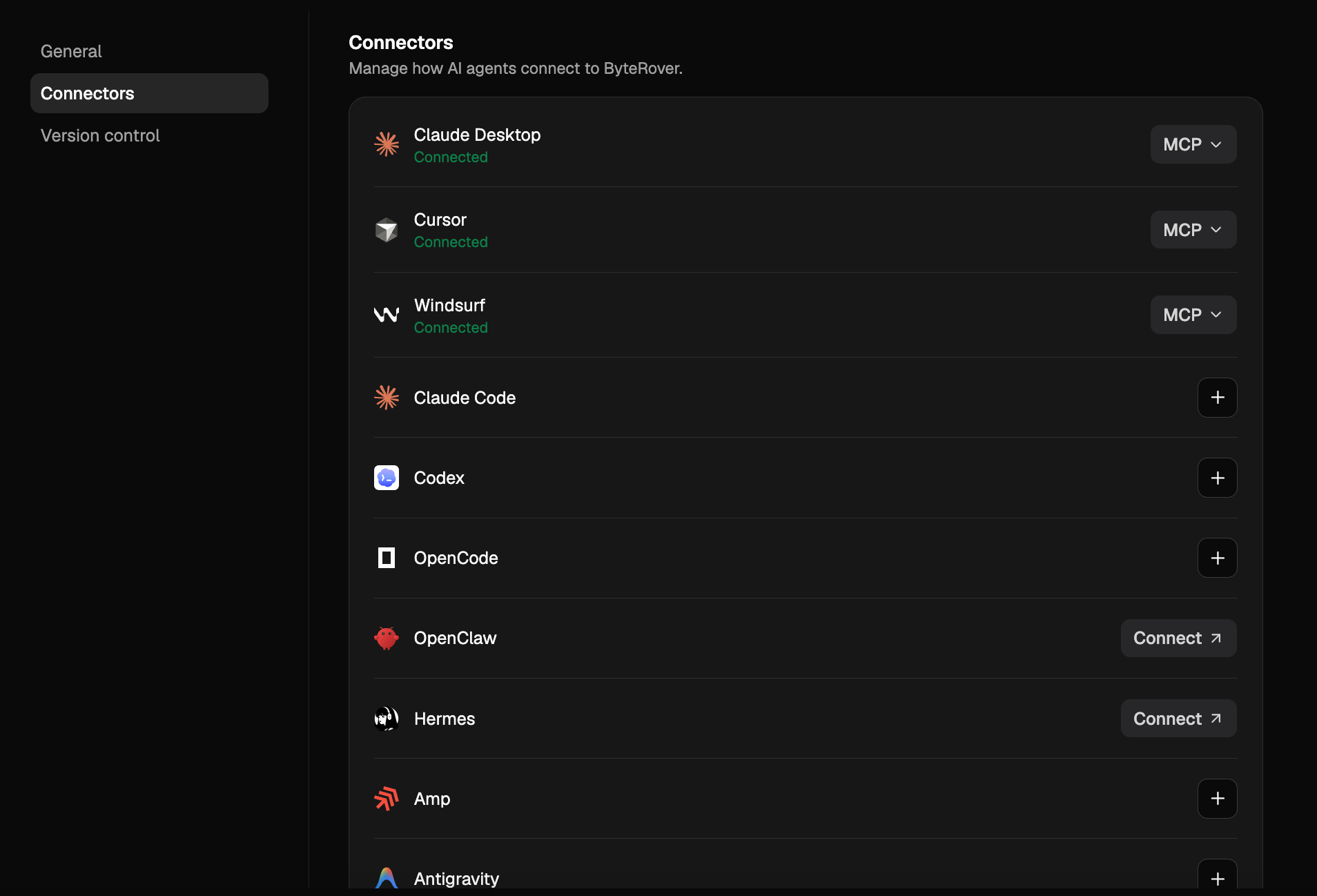 Wire your coding agents to ByteRover without editing their config files by hand. This is the browser equivalent of `brv connectors` — see the [Agent Connectors overview](/connectors/overview) for what each integration does.
* See every supported agent and whether it's already connected
* Install a connector for any agent ByteRover detects on your machine
* Remove a connector without hunting down the relevant config file
## Version control
Wire your coding agents to ByteRover without editing their config files by hand. This is the browser equivalent of `brv connectors` — see the [Agent Connectors overview](/connectors/overview) for what each integration does.
* See every supported agent and whether it's already connected
* Install a connector for any agent ByteRover detects on your machine
* Remove a connector without hunting down the relevant config file
## Version control
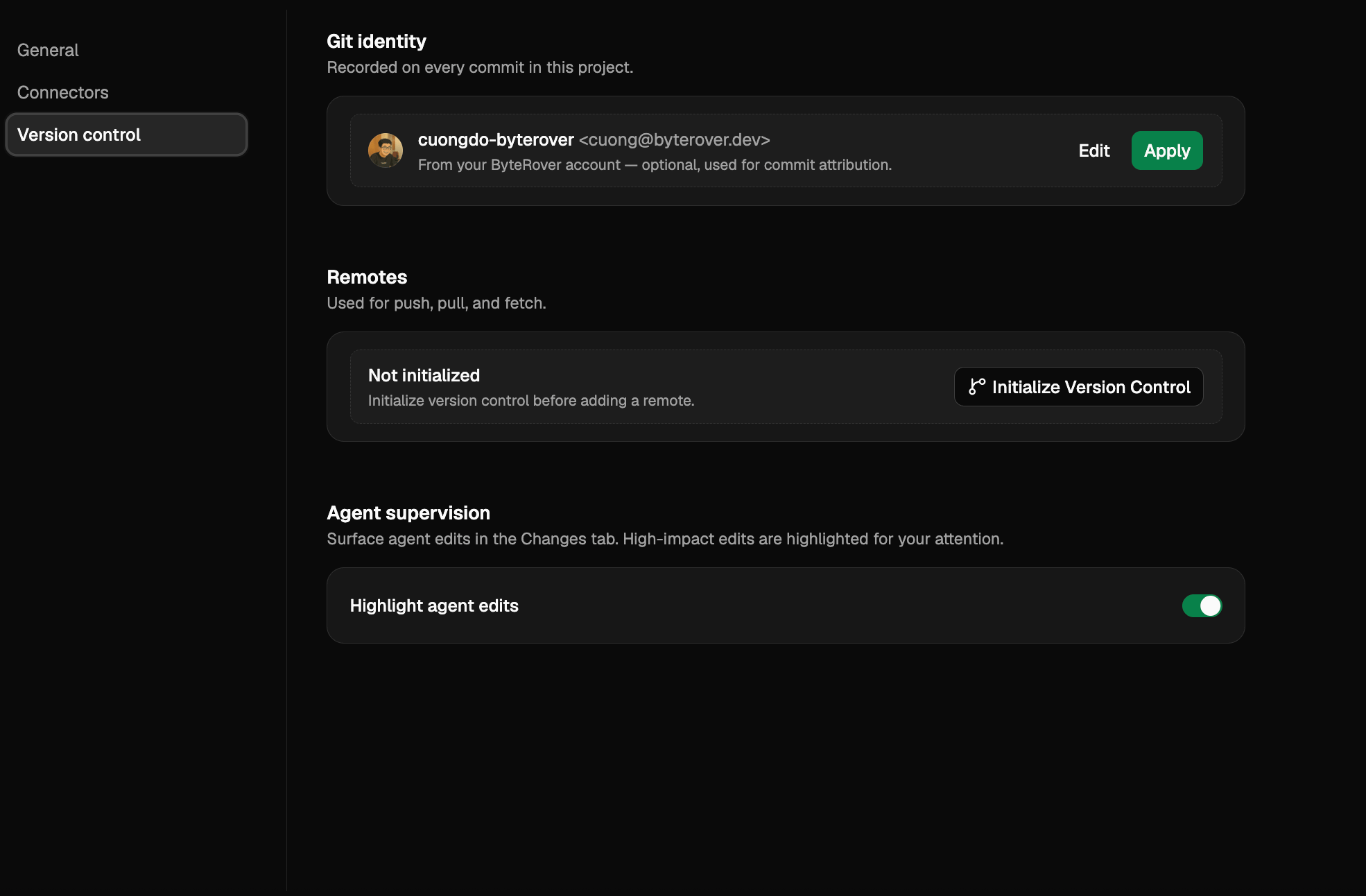 Three panels: **Identity**, **Remotes**, and **Agent supervision**. All three mirror commands you can also run on the CLI (`brv vc config`, `brv vc remote`, and `brv review --enable` / `brv review --disable`), and all three are scoped to the current project.
### Git identity
Commits to your context tree need a name and email. Both are stored locally per project — the same values `brv vc config user.name` and `brv vc config user.email` would set.
The panel renders one of three states:
* **Configured** — name and email are shown inline as `Name `. Click **Edit** to change either field.
* **Not set, signed in to ByteRover** — your account name and email appear in a dashed-bordered row with a one-click **Apply** button that seeds the values from your account. **Edit** is still available if you want a different identity.
* **Not set, signed out** — a "Set manually" button opens the empty form.
The form validates the email and only enables **Save** when both fields are non-empty and the email is valid.
Identity is optional for browsing the context tree, but `brv vc commit` and the **Commit** button in the [Changes tab](/local-web-ui/changes) require it. If you commit before configuring identity, the Changes tab routes you back here.
### Origin remote
Your local context tree can point at one ByteRover cloud remote, named `origin`. Push, pull, and fetch in the [Changes tab](/local-web-ui/changes) and on the CLI all use this URL.
* **Add a remote** — when version control is initialized but no remote is set, the panel header shows an **Add remote** button. The form accepts an HTTPS URL like `https://byterover.dev//.git` and validates it before saving. Use **Find in ByteRover** to open the dashboard in a new tab and copy the URL.
* **Edit the URL** — click **Edit** next to the existing `origin` row to replace the URL. The form previews "Replaces current URL ``" so you can confirm before saving.
* **Delete the remote** — click **Delete** next to the `origin` row. A confirmation dialog explains that push, pull, and fetch will be disabled until a new remote is set; click **Remove remote** to confirm or **Cancel** to back out.
If version control hasn't been initialized for this project yet, the panel shows an **Initialize version control** button instead of the remote form.
### Agent supervision
When a connected agent curates into the context tree, ByteRover can flag high-impact edits for your review before they ship to your team. The **Agent supervision** panel controls whether that flagging is on for this project.
* **Highlight agent edits** — the only control in the panel. When on, agent-generated changes appear in the [Changes tab](/local-web-ui/changes) with op-type and impact badges, and high-impact edits get an amber pulse so you can spot them at a glance. When off, agent edits flow into the same Changes lists as your own edits, with no extra annotation or pending-review state.
The toggle persists per project and mirrors the CLI: turning it off is equivalent to running [`brv review --disable`](/review/manage-reviews#disable-the-review-log) in this project, and turning it back on is the same as `brv review --enable`. The state is shared — flipping the switch in either place affects the other.
## Next steps
Full reference for the General-section keys, including value formats and on-disk location.
Reference for supported agents.
Connect LLM providers.
Full reference for the underlying version-control commands.
Three panels: **Identity**, **Remotes**, and **Agent supervision**. All three mirror commands you can also run on the CLI (`brv vc config`, `brv vc remote`, and `brv review --enable` / `brv review --disable`), and all three are scoped to the current project.
### Git identity
Commits to your context tree need a name and email. Both are stored locally per project — the same values `brv vc config user.name` and `brv vc config user.email` would set.
The panel renders one of three states:
* **Configured** — name and email are shown inline as `Name `. Click **Edit** to change either field.
* **Not set, signed in to ByteRover** — your account name and email appear in a dashed-bordered row with a one-click **Apply** button that seeds the values from your account. **Edit** is still available if you want a different identity.
* **Not set, signed out** — a "Set manually" button opens the empty form.
The form validates the email and only enables **Save** when both fields are non-empty and the email is valid.
Identity is optional for browsing the context tree, but `brv vc commit` and the **Commit** button in the [Changes tab](/local-web-ui/changes) require it. If you commit before configuring identity, the Changes tab routes you back here.
### Origin remote
Your local context tree can point at one ByteRover cloud remote, named `origin`. Push, pull, and fetch in the [Changes tab](/local-web-ui/changes) and on the CLI all use this URL.
* **Add a remote** — when version control is initialized but no remote is set, the panel header shows an **Add remote** button. The form accepts an HTTPS URL like `https://byterover.dev//.git` and validates it before saving. Use **Find in ByteRover** to open the dashboard in a new tab and copy the URL.
* **Edit the URL** — click **Edit** next to the existing `origin` row to replace the URL. The form previews "Replaces current URL ``" so you can confirm before saving.
* **Delete the remote** — click **Delete** next to the `origin` row. A confirmation dialog explains that push, pull, and fetch will be disabled until a new remote is set; click **Remove remote** to confirm or **Cancel** to back out.
If version control hasn't been initialized for this project yet, the panel shows an **Initialize version control** button instead of the remote form.
### Agent supervision
When a connected agent curates into the context tree, ByteRover can flag high-impact edits for your review before they ship to your team. The **Agent supervision** panel controls whether that flagging is on for this project.
* **Highlight agent edits** — the only control in the panel. When on, agent-generated changes appear in the [Changes tab](/local-web-ui/changes) with op-type and impact badges, and high-impact edits get an amber pulse so you can spot them at a glance. When off, agent edits flow into the same Changes lists as your own edits, with no extra annotation or pending-review state.
The toggle persists per project and mirrors the CLI: turning it off is equivalent to running [`brv review --disable`](/review/manage-reviews#disable-the-review-log) in this project, and turning it back on is the same as `brv review --enable`. The state is shared — flipping the switch in either place affects the other.
## Next steps
Full reference for the General-section keys, including value formats and on-disk location.
Reference for supported agents.
Connect LLM providers.
Full reference for the underlying version-control commands.